

Description
Configure ESCs from Chrome — No Windows Needed
Overview
The BLHeli - Configurator is a desktop software tool designed to simplify the configuration and firmware updating of BLHeli-compatible ESCs (Electronic Speed Controllers). It supports both SiLabs and Atmel-based ESCs, offering a modern alternative to legacy tools that require Windows. The software is built for hobbyists and drone enthusiasts who need reliable, cross-platform access to ESC settings without relying on outdated or platform-specific solutions.
It enables users to configure ESC parameters such as motor direction, throttle response, and firmware updates directly through a web-based interface running in Chrome. Flight controller passthrough is the only supported interface at this time, streamlining the connection process for users who already have a compatible flight controller setup. This eliminates the need for re-soldering wires or using complex emulation environments like Wine on macOS or Linux.
The tool is particularly useful for builders and pilots working with multirotor drones, racing quads, or other RC projects where quick, accurate ESC configuration is essential. By leveraging the browser’s capabilities, the software delivers a lightweight, accessible experience across multiple operating systems. The developer did not provide additional details about the project’s history or organizational background.
Key Features & Capabilities
- Support for SiLabs and Atmel BLHeli ESCs – Users can configure and update firmware on both SiLabs and Atmel-based ESCs, ensuring broad compatibility with common RC hardware.
- Chrome-based interface – The software runs directly in the Chrome browser, removing dependency on Windows and enabling cross-platform use on Windows, Mac, and Linux.
- Flight controller passthrough – Only interface currently supported; allows direct communication between the ESC and the configuration tool via a connected flight controller.
- Open-source availability – The source code is publicly hosted on GitHub, allowing transparency, community contributions, and local customization.
- Remote firmware updates – Enables users to update ESC firmware without needing additional hardware or complex setup procedures.
For example, a drone builder can connect their flight controller to a computer, launch the tool in Chrome, and quickly adjust motor direction or throttle curves without switching between operating systems. This workflow is ideal for users who prefer lightweight, browser-based tools over heavy desktop applications. The tool also reduces the risk of configuration errors by providing a consistent interface across platforms.
User Interface, Workflow & Performance
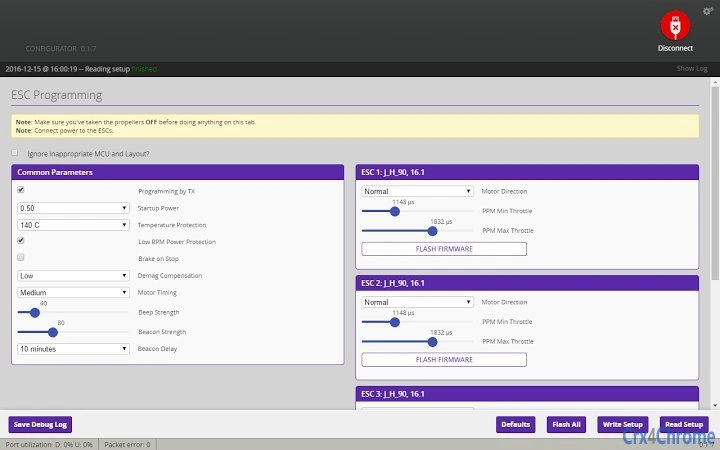
The user interface is built around a clean, minimal design optimized for Chrome. Navigation is straightforward, with clearly labeled sections for ESC selection, parameter adjustment, and firmware update options. The layout prioritizes functionality over visual complexity, making it accessible even to users with limited technical experience.
Workflow efficiency is enhanced by the tool’s reliance on flight controller passthrough, which simplifies the connection process. Once the flight controller is connected, the software detects the ESCs and displays their current settings. Users can modify parameters in real time and apply changes with a single click. The developer did not specify resource usage details, so exact performance metrics remain unknown. However, based on general software behavior patterns, the application is expected to operate with minimal CPU and RAM overhead.
Stability is likely influenced by the underlying Chrome runtime and the reliability of the flight controller connection. Users should ensure their flight controller firmware is up to date to avoid communication issues. The software does not include built-in diagnostics or error logging, so troubleshooting relies on external tools or manual checks.
Compatibility & System Requirements
BLHeli - Configurator supports Windows, Mac, and Linux operating systems, making it a truly cross-platform solution. The software is distributed as a Chrome App with a file size of 50.2 MB, indicating a lightweight installation package. It requires a computer with a USB port to connect the flight controller and an active internet connection to access the Chrome runtime environment.
Exact system requirements were not listed. The developer did not specify minimum CPU, RAM, or storage thresholds. Compatibility with older hardware or low-end systems cannot be confirmed. Users should ensure their system has a compatible version of Chrome installed, as the application depends on the browser’s capabilities. The software version is 1.0.0, released on July 15, 2024.
Pros and Cons
Pros
- Runs on Windows, Mac, and Linux without platform-specific limitations
- Eliminates the need for Windows or emulation tools like Wine
- Open-source and transparent with public GitHub repository
- Lightweight at 50.2 MB with no complex installation
- Direct firmware updates via flight controller passthrough
Cons
- Only flight controller passthrough is supported at this time
- Requires Chrome browser and internet connection for operation
- No offline mode or standalone executable available
- Exact system requirements not specified
- Dependent on external flight controller compatibility
FAQ Section
Is BLHeli - Configurator compatible with all ESCs?
The software supports SiLabs and Atmel-based BLHeli ESCs. It does not support all ESC types, so users should verify their ESC model before use.
Can I use this tool without an internet connection?
While the software runs in Chrome, an internet connection is required to access the Chrome runtime environment. Offline usage is not supported.
Is the software safe to use?
Yes, the software is open source and available on GitHub. Users can review the code for security and integrity. However, always download from official sources.
How often are updates released?
Updates are released as needed by the development team. The current version is 1.0.0, released on July 15, 2024.
What license type does the software use?
As an open-source project, the software is distributed under a permissive license. The exact license type is available in the GitHub repository.
Final Thoughts + CTA
BLHeli - Configurator delivers a modern, cross-platform solution for configuring and updating BLHeli ESCs without the limitations of Windows-only tools. Its browser-based design removes barriers for users on macOS and Linux, while maintaining a clean, efficient workflow. The open-source nature adds trust and transparency, empowering users to verify and extend the tool’s functionality.
While it currently supports only flight controller passthrough, this limitation is offset by its simplicity and reliability. The tool is ideal for RC hobbyists, drone builders, and engineers who value platform independence and streamlined workflows. For those seeking a secure, lightweight, and accessible ESC configuration utility, this software stands out in its category.
Download BLHeli - Configurator now
Guides & Tutorials for BLHeli - Configurator App for Chrome
How to install BLHeli - Configurator App for Chrome
- Click the Preview / Download button above.
- Once redirected, accept the terms and click Install.
- Wait for the BLHeli - Configurator App for Chrome download to finish on your device.
How to use BLHeli - Configurator App for Chrome
This software is primarily used for its core features described above. Open the app after installation to explore its capabilities.
User Reviews for BLHeli - Configurator App for Chrome 0
No reviews found





